FleetSQL
  FleetTAB
  FleetAI
  Ecodriving
  Maintenance
  Fleet Config
  Logbook
  Utilization
  Merger
  Routly
A tax office does not ask how far a van drove. It asks which of those kilometres were work. Wialon answers the first question perfectly and has no field for the second, which is why the mileage claim gets rebuilt every month in a spreadsheet that nobody else can see.
Logbook, our driving logbook for Wialon, is released and running at logbook.theassettrack.com. Every trip the account already recorded arrives in one table — when and where it started and ended, how far, how fast, which driver — and each one is marked business, personal or left unclassified. That mark is written back to the trip in Wialon, so it belongs to the account rather than to the browser it was set in.
Try it: the Logbook product page has the full feature breakdown and the FAQ. The app is free on your own Wialon account, and there is nothing to create an account for.
Wialon records the trip, not its purpose
Trips are already there. Wialon detects them, measures them, addresses both ends and puts them in a report. What it does not hold is the one attribute that decides whether a trip can be claimed, invoiced or taxed as a benefit: what it was for.
So the work moves into Excel. Export the month, sort by vehicle, mark up the rows, total the business kilometres, attach the sheet to the claim. Next month starts from an empty sheet again, and the classification exists only inside the file the person who did it saved. Two people doing it produce two versions of the same month.
Logbook keeps that work where the trips are.
One table, every trip
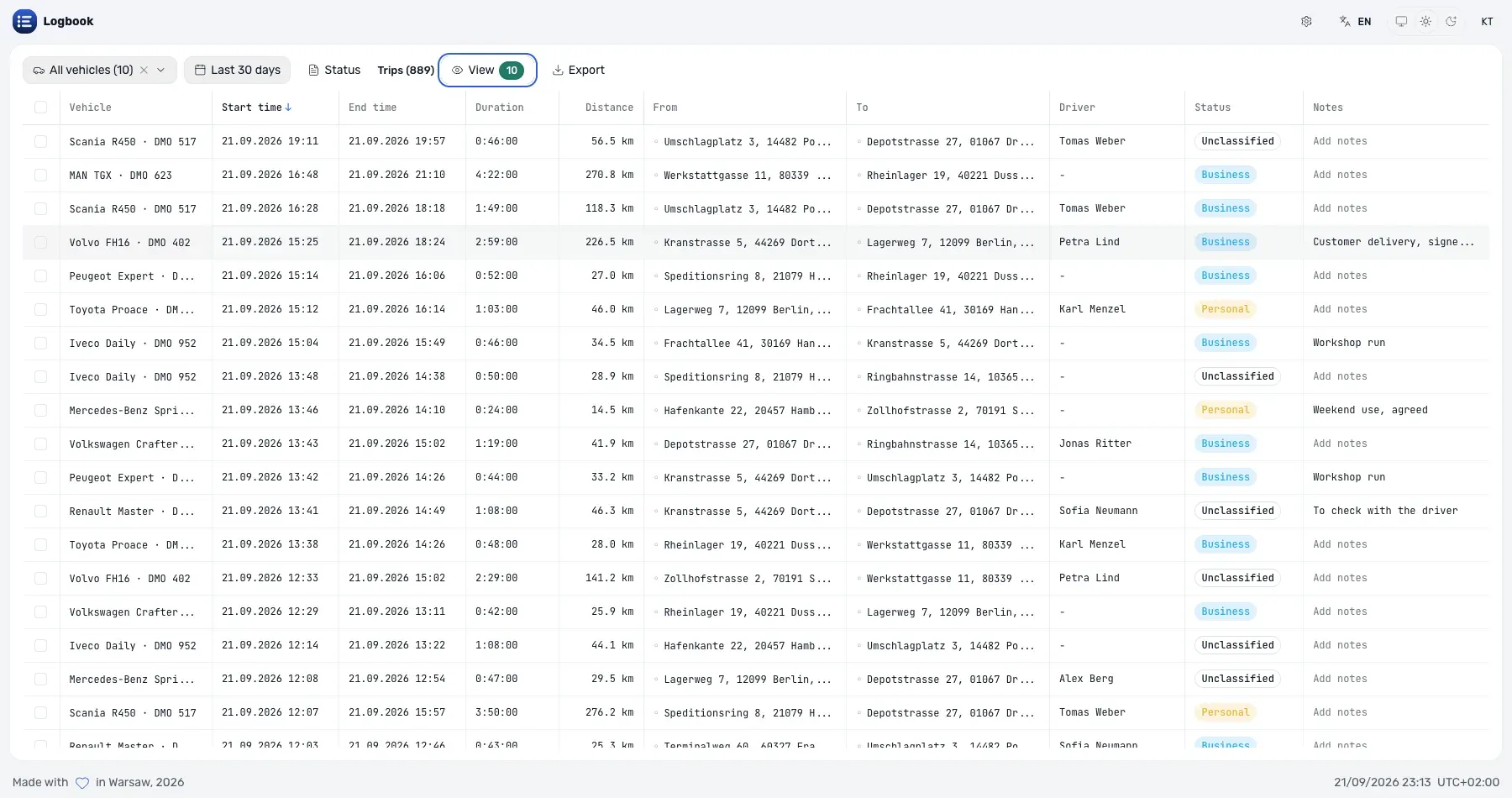
The table is the product. Per trip, it carries:
- When — start and end time, and the duration.
- Where — the start and end address, geocoded.
- How far and how fast — distance, average and top speed, and the odometer at both ends.
- Who and what — the vehicle, the driver, CO2, the status and the note.
Sort on any column, choose which columns you see, and the choice survives a reload. The view below is nine columns of a month’s driving. It is a demo fleet — ten invented vehicles, their drivers and their addresses — because a screenshot of the product is not a reason to show anybody’s account.
Business, personal or unclassified — and it stays in Wialon
Each row carries a status control with three positions. Setting one writes it back to the Wialon trip, along with the driver assignment and the note.
That is the difference between this and the spreadsheet. The classification follows the account: a colleague who opens the app sees the same month already sorted out, the record survives the laptop it was made on, and a year later the answer to “was this trip business?” is still attached to the trip rather than to a file somebody has to find.
A month is classified in bulk, not row by row
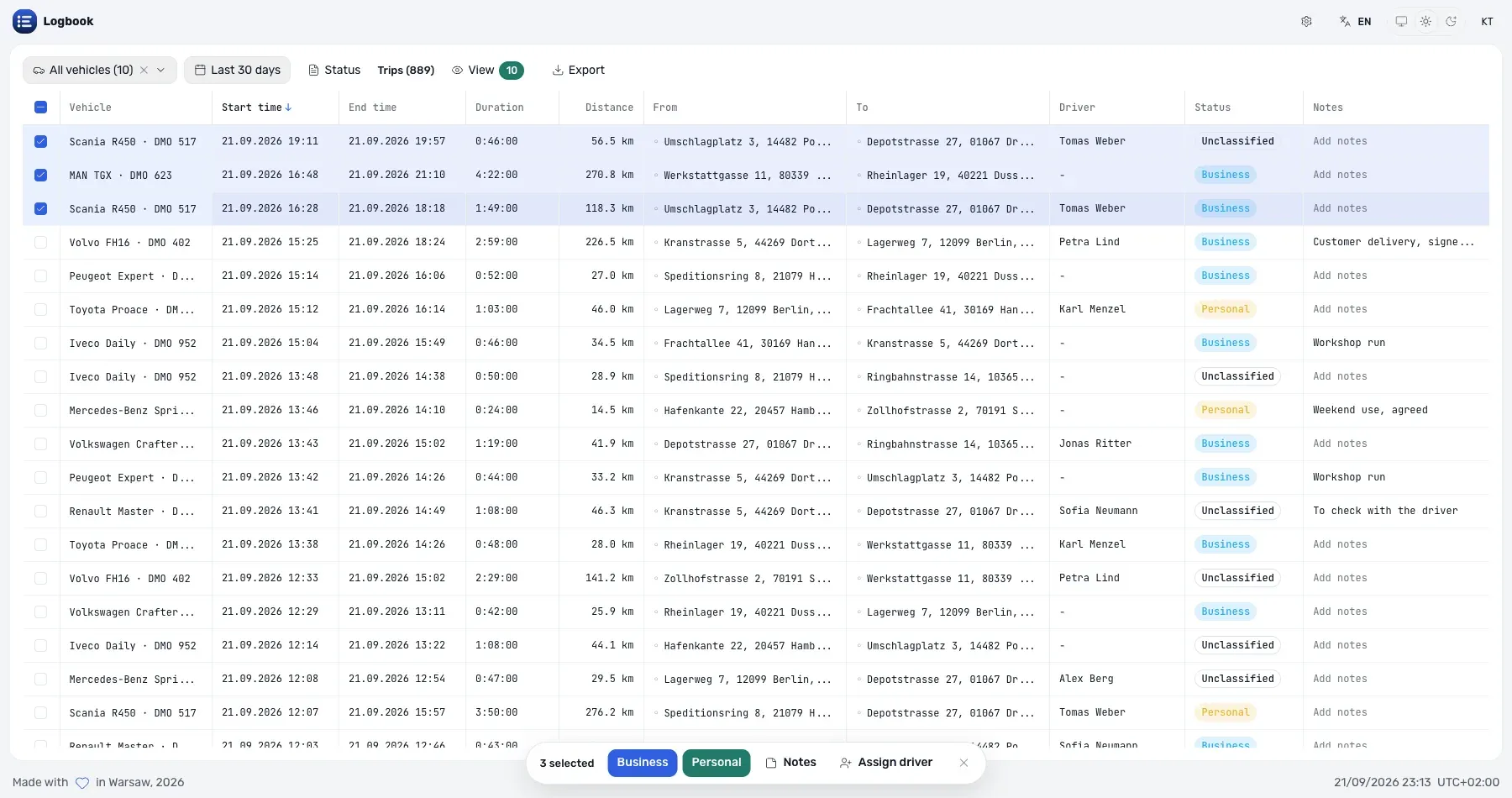
Nobody clicks three thousand rows. The filters narrow the table to the trips that share an answer, and the bulk bar applies it to all of them:
- Filter by vehicle, driver, group, brand, model, registration plate, date range and time of day — or only the trips carrying a note.
- Select any number of rows, including everything the filter left.
- Apply a classification, a driver or the same note to the whole selection.
The status filter carries a count beside each option, so “how much of this month is still unclassified” is answered before anything is filtered at all — 537 business trips out of 889 in the month below.
Export is the deliverable
A mileage claim is an attachment, not a screen. Whatever the filters left is exported to Excel or CSV: one vehicle’s business trips for the quarter, one driver’s personal kilometres for a benefit calculation, the whole fleet’s month for the accountant.
Because the classification lives on the trips, the export is reproducible. Run the same filter next year and the same rows come back with the same marks.
Nothing stored, nothing estimated
Logbook has no database. The trips are the intervals Wialon already recorded, read live through the Remote API each time you open the app, and the addresses come from Wialon’s own geocoder.
That matters for one reason: the numbers agree. A distance in Logbook is the distance a Wialon report prints for the same trip, because it is the same trip. There is no second pipeline to fall behind, no nightly sync to fail quietly, and no copy of the fleet’s movement sitting in our infrastructure.
It holds no credential of its own
There is no Logbook account and no token stored in the deployment. Two ways in:
- Sign in with Wialon — open logbook.theassettrack.com, choose your Wialon server, and sign in through Wialon’s own login page.
- Register it in the Apps configurator — in Wialon CMS Manager, create an application pointing at the same URL with the advanced URL parameters enabled, and it opens from inside Wialon with the session already established.
Either way it reads the units you can already see, as you, and the access is revocable from Wialon at any time. The interface is available in English, Spanish, French, Russian and Swedish.
Wialon logbook FAQ
Where do the trips come from?
From Wialon. The app reads the trip intervals the account already recorded — it does not detect trips of its own, so what it shows is what a Wialon report shows for the same period.
Does the classification stay in Wialon?
Yes. Business, personal or unclassified is written back to the trip itself, with the driver and the note. Open the app on another machine, or hand the account to a colleague, and the month is still classified.
Can it produce a tax-office mileage claim?
It produces the table a claim is built from: the filtered trips with their dates, addresses, distances and purpose, exported to Excel or CSV. What a given tax authority wants on top of that is local, and the export is the attachment you build it from.
What about drivers who are not in Wialon?
Assign the driver on the trips themselves. The bulk action applies one driver to any number of trips at once, which is the usual answer for a pool vehicle that several people share.
Can we run it under our own brand?
Yes — your logo, your colours, your domain, from the login screen on, at $500 a month for the application. The commercial relationship with your customer stays yours, and nothing about the app changes for them.
Getting started
Open logbook.theassettrack.com and connect with your Wialon account or token. It is free, and the Logbook product page has the rest of the detail.
If the claim you have to produce needs a column, a filter or an export format that is not there yet, send us a note — most of what is in this app arrived that way.