FleetSQL
  FleetTAB
  FleetAI
  Ecodriving
  Maintenance
  Fleet Config
  Logbook
  Utilization
  Merger
  Routly
A Wialon unit binds to exactly one tracking device. Everything Wialon knows about that vehicle has to arrive through that one device’s protocol — which means the cold-chain probe, the weighbridge, the ERP job feed and the driver app the customer already owns have no way in. They cannot become a sensor, a report column or a notification, however important the number is.
Message Merger is our answer to that: a service that accepts a webhook from any system, maps its fields onto Wialon message parameters, and writes them into a unit that keeps its real tracker.
third-party system  ──webhook──▶  Message Merger  ──▶  Wialon unit 24461912
  {"celsius": -18.4}                 field mapping        param cargo_temp = -18.4
                                                          → sensor → report → alert
This is the engineering behind that: which of Wialon’s two write paths survives contact with a unit that already has a tracker, and what the surviving one costs you in design. What the product does for a fleet is a separate read — sensors from systems Wialon cannot see — and the Message Merger product page has the feature breakdown.
Wialon’s own answer is a second platform
Ask how to get extra data onto a unit and the standard route is flespi: merge the streams there, feed Wialon one combined virtual device. It works, and for a customer already running flespi it is often still the right answer — we build on that stack too.
What it costs is a second platform in the path: another vendor, another bill, another system to operate and monitor, for the sake of one temperature reading landing next to a tracker’s messages. For a partner with one integration to deliver, that is a lot of infrastructure to acquire.
The finding: only one of the two ways in works
Wialon has two ways to put a message on a unit, and the difference between them decides the whole design:
| Path | Real-time | Works on a unit that already has a tracker |
|---|---|---|
| Wialon IPS (TCP) | yes | no — the unit’s device type has to be Wialon IPS |
exchange/import_messages (HTTP) | no, batched | yes — any unit, any device type |
The real-time path is the one that cannot be used. Pointing IPS at a unit means changing its device type, and that unit already has a tracker speaking its own protocol — the change would cost the tracking to gain the temperature.
So the service takes the import path, and everything else follows from that choice: batches rather than a stream, buffers per unit, one import at a time across the account, and the honesty that acceptance is not the same as completion.
A hook per sender, a mapping per hook
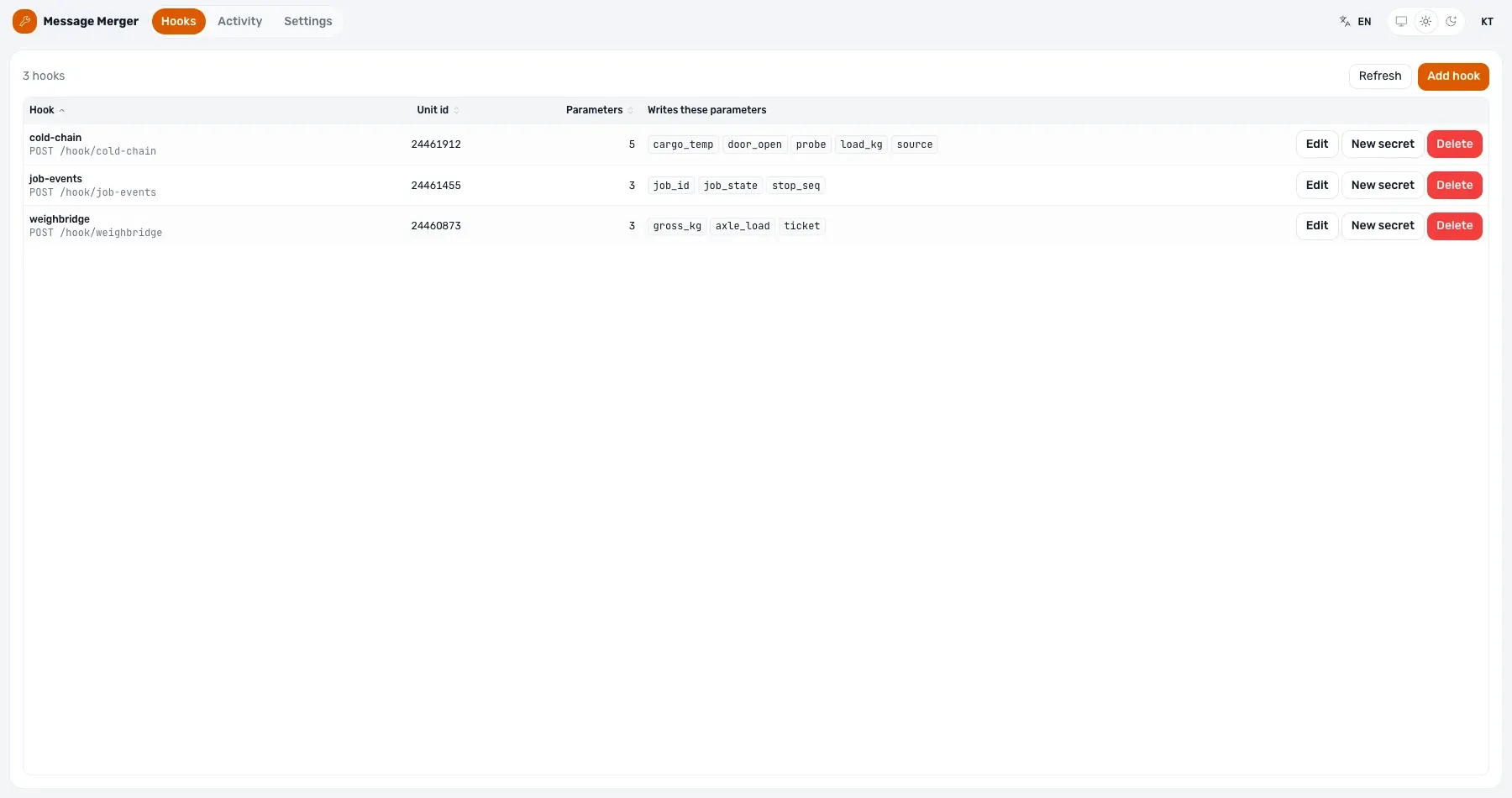
Each system that sends data gets its own endpoint, its own secret and its own field mapping. Adding a sender changes nothing for the ones already running.
A mapping says where in the sender’s JSON each value lives and what it becomes on the unit:
- Parameter name — what a Wialon sensor will bind to. Choose it once and never rename it: a rename breaks the customer’s sensors, reports and notifications downstream.
- From path — a dot path into the body, like
reading.celsius, or a literal value for a constant such as the source tag. - Stored as — double, int, long, text or bool, because Wialon types its parameters.
- Scale and offset — for senders that report in grams, millivolts or Kelvin.
- Time, latitude and longitude paths — optional. A sender that does not know where the vehicle is writes a message with no position rather than one at 0.0.
- Batch path — for a body that carries an array of readings instead of one.
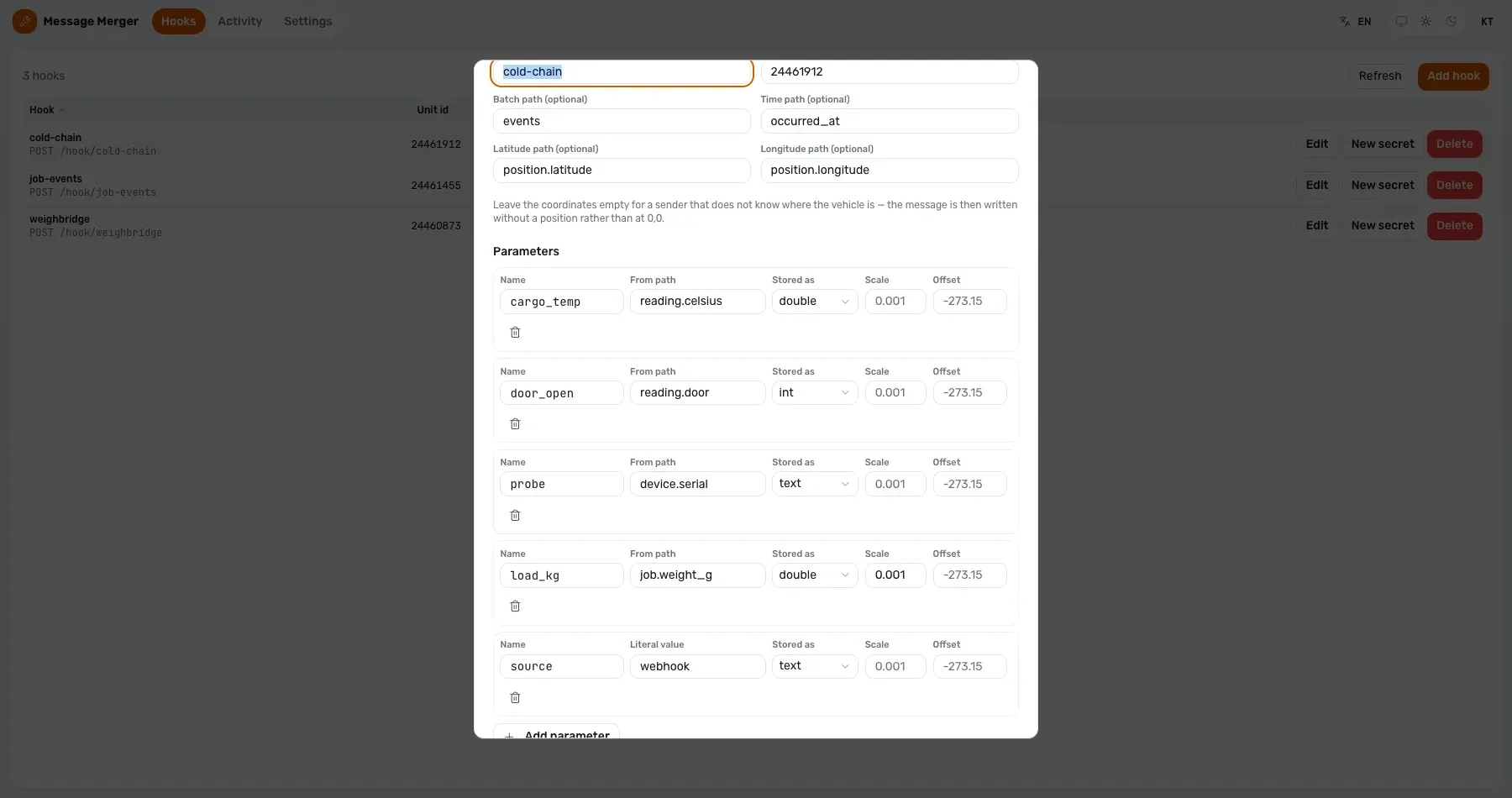
The senders and the queue figures in these screenshots are made up — the service’s whole output is a write into somebody’s Wialon account, and a screenshot is not a reason to do that to one.
What happens between the webhook and the unit
The webhook is acknowledged the moment the body validates. What happens after that is a queue, and the admin app shows it rather than claiming success:
- A buffer per unit. Readings accumulate and flush as one file when the batch fills or its timer expires.
import_messagesis a bulk file API, not a stream; one import per webhook does not survive any real load. - One import at a time across the account. Wialon answers a concurrent import with error 1003 — the account is busy with a report or another import — so imports are serialised rather than retried into the same collision.
- A completion check. The count Wialon reports back through its own event stream is compared with what was sent, and any difference is treated as a failure rather than a success with missing rows.
- A dead letter. A batch that exhausts its attempts is written to disk with the reason Wialon gave, so it can be replayed instead of disappearing.
Two traps worth knowing before you design on it
The live spike that proved this chain also produced the two facts that shape what can be built on it. Both cost us a wrong conclusion the first time round:
- An imported message does not merge with the tracker’s message at the same timestamp. The two sit side by side. A sensor bound to our parameter therefore reads messages that carry that parameter and no position — which matters if a report expects coordinates on every row.
- A future timestamp is silently rewritten to the arrival time. Nothing can be post-dated into the account, and a sender with a clock running fast will have its readings quietly restamped rather than rejected.
Neither is a bug in the service. They are properties of the import path, and knowing them is the difference between an integration that behaves and one that produces a report nobody can explain.
It has run end to end on a live account
Milestone 0 ran on 2026-08-12 against a real account: a bare .wln file was accepted with no ZIP, the import was acknowledged in seconds, and the message appeared in Wialon’s own Messages tab — labelled Imported message, carrying our parameter, on a unit that kept its real tracker.
Then the part that matters commercially: a Wialon sensor bound to that parameter read the value back as -18.40 °C, in Wialon’s own formatting. That is what a report renders and what a notification tests, which is the whole point of putting the number on the unit instead of in a dashboard beside it.
Webhooks into Wialon FAQ
Is this the same as Wialon webhooks?
No, and they are opposite directions. Wialon has no outbound webhooks — getting data out means polling or notifications. This is data going the other way: a third-party system posting in, onto a unit.
Does the tracker have to be removed or reconfigured?
No. Nothing about the unit’s device changes. The imported messages land alongside the tracker’s own on the same unit.
How fast does a value appear?
Seconds, not milliseconds. The webhook is acknowledged immediately and the import is batched behind it. If a value has to arrive in real time and drive an instant alert, this is the wrong path and flespi is the right one.
What stops anyone posting to the endpoint?
Each hook carries its own secret, sent as a bearer token, and can write only the parameters its mapping names, only onto the unit it is configured for. Rotating a leaked secret does not require redefining the hook.
Whose Wialon credential does it write with?
Yours. The service is armed from its settings page with a token the operator supplies — their own Wialon session is the proof that they administer the account — or pinned in the deployment for an installation that should only ever serve one account.
Can we get one?
Yes, by request while it is in preview. Tell us the unit and the system holding the data, and we map its fields onto Wialon parameters with you.
Getting access
The Message Merger product page has the feature breakdown and the current state. To put a sender live on your account, send us a note with the system that has the data and the unit it belongs on — the mapping takes a conversation, not a project.