 FleetSQL
  FleetTAB
  FleetAI
  Ecodriving
  Maintenance
  Fleet Config
  Logbook
  Utilization
  Merger
  Routly
Wialon Driving Logbook: Business or Personal
Every trip Wialon recorded in one table — classified business or personal, written back to the trip, and exported to Excel for a mileage claim.
Read moreWialon already records the trips. Logbook puts all of them in one table — when and where each started and ended, how far, how fast, which driver — then lets you mark each one business or personal, writes that back to the Wialon trip, and exports the filtered table for a mileage claim.
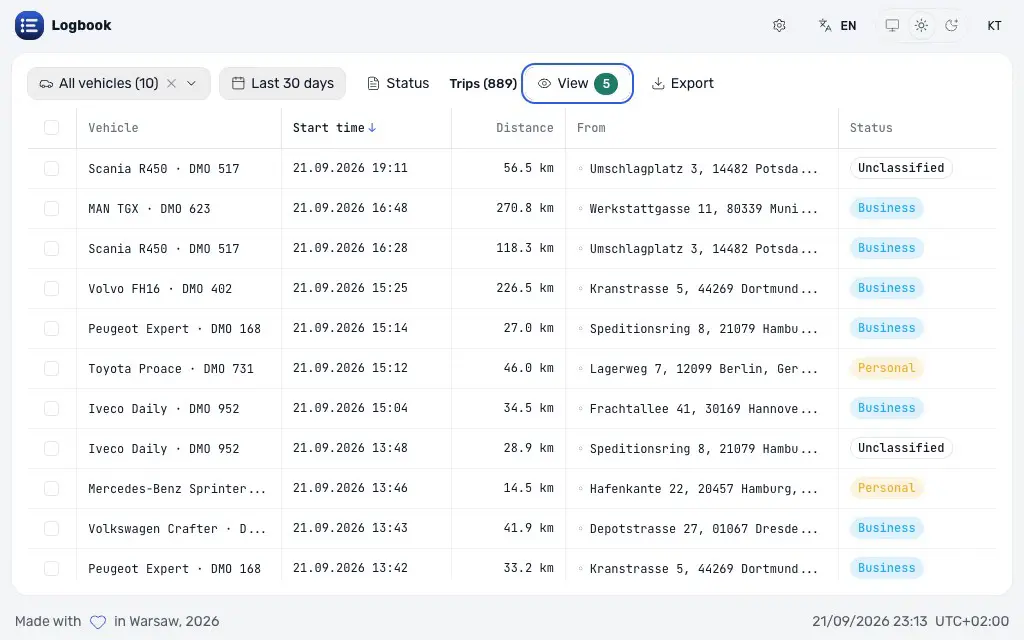
The interval is already in the account with its distance and its addresses. What decides whether those kilometres can be claimed is a purpose, and there is nowhere in Wialon to record one.
Export, sort, mark up in Excel — and next month starts from nothing, while two people end up holding two versions of the same month.
Start and end time, start and end address, duration, distance, average and top speed, the odometer at both ends, CO2 and the driver.
The classification is written back to the Wialon trip, so it follows the account rather than the browser it was set in.
Select any number of trips and assign a driver or apply the same note to all of them at once.
Vehicles, drivers, groups, brand, model, registration plate, date range and time of day — or only the trips carrying a note.
The filtered table to Excel or CSV, which is the attachment a mileage claim or a tax return actually needs.
The trips are the intervals Wialon already recorded, read live through the Remote API. This app keeps no database of its own.
The same two numbers the homepage states: free on the Wialon Marketplace under our name, $500 a month per application under your brand.
Free
The application as it stands, at no charge, under our name.
$500 / month
The same application under the partner's brand, colours and domain, from the login screen on. Priced per application, per month.
There is no account to create. Sign in against your own Wialon server, or register the app in the CMS so it opens from Wialon already authenticated. Either way it reads the units you can already see, as you.
From Wialon. The app reads the trip intervals the account already recorded, live through the Remote API — it does not detect trips of its own, so what it shows is what a Wialon report shows.
Yes. Business, personal or unclassified is written back to the trip itself, along with the driver and the note. Open the app on another machine, or hand the account to an accountant, and the marks are already there.
Yes, because none of it lives in the browser. Two people working through the same month see each other's marks as soon as the table refreshes.
The table as filtered on screen, in Excel or CSV, with every column you have chosen to show — times, addresses, distance, speeds, odometers, driver, classification and notes.
Neither. The session belongs to the signed-in user and the trips are read on demand. The deployment holds no credential of its own, so it can never see more than the person using it can.
Yes, under your brand and domain, with the commercial relationship yours. $500 a month per application; anything it does not already do is quoted on its own.
Every trip Wialon recorded in one table — classified business or personal, written back to the trip, and exported to Excel for a mileage claim.
Read moreAsk your Wialon fleet in plain words and get a table, map or PDF back. FleetAI is also an MCP server and skill for Claude Code, Codex and Cursor.
Read moreThe Wialon partner model explained: billing plans and margin, where leads come from, statuses, and where new partners get stuck.
Read more“Our client needed a data pipeline. It came back working, plus a few Wialon fixes we had not asked for. That client trusts us more now.”
 Faiz K. Customer Manager · Trakpro Limited


