 FleetSQL
  FleetTAB
  FleetAI
  Ecodriving
  Maintenance
  Fleet Config
  Logbook
  Utilization
  Merger
  Routly
Wialon Driving Logbook: Business or Personal
Every trip Wialon recorded in one table — classified business or personal, written back to the trip, and exported to Excel for a mileage claim.
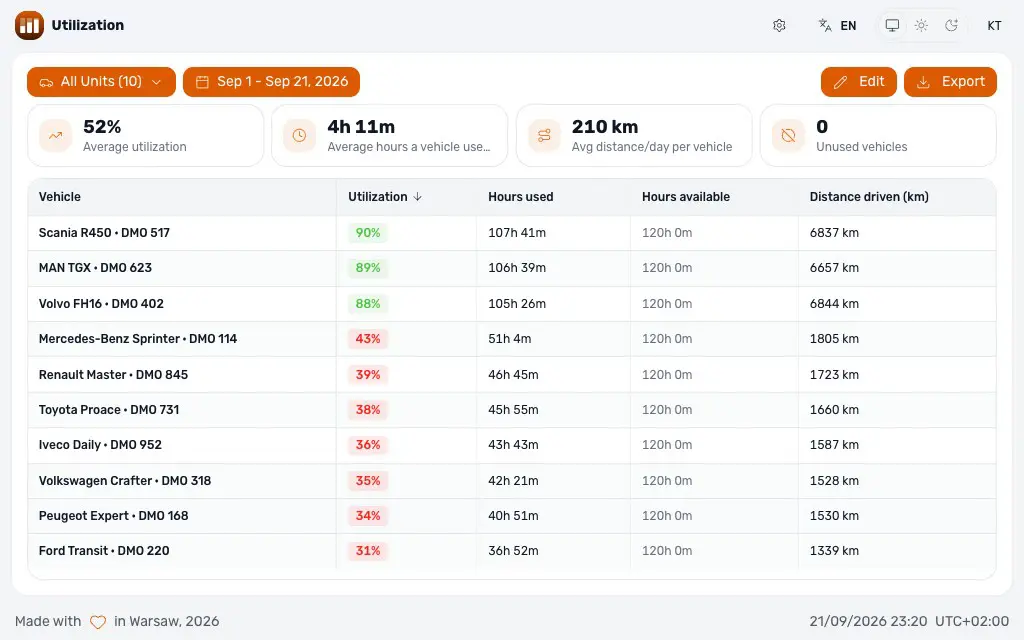
Read moreWialon says how far a vehicle drove. Utilization says how much of the time it was supposed to be working it was moving at all — every unit measured against an operating window you define, scored on hours, on kilometres, or on both, with the vehicles that never moved counted separately.
Wialon adds up what every vehicle did. Whether that was a full week's work or two mornings is a comparison against what the vehicle was supposed to do, and there is nothing in the account that holds it.
Keeping a vehicle, moving it to another depot or handing it back at the end of a lease is a question about utilization. Without a number per vehicle, the answer comes from whoever remembers it best.
Which weekdays count and between which hours. A vehicle that ran all Sunday is not more utilised than one that ran every Tuesday morning, and the report only ever looks inside the window.
Hours used against hours available, distance driven against distance expected, and a score that weighs the two in whatever proportion the fleet is actually run on.
Average utilization, average hours per vehicle per day, average distance per day, and how many vehicles did not move at all in the period.
Per vehicle: the score, hours used against available, distance driven against expected — sorted worst-first, which is the order a fleet review is held in.
The settings live on a Wialon resource rather than in a browser, so everyone measures against the same operating window and the same expectations.
Excel for the analysis, PDF for the meeting, JSON for whatever system the answer has to land in next.
The same two numbers the homepage states: free on the Wialon Marketplace under our name, $500 a month per application under your brand.
Free
The application as it stands, at no charge, under our name.
$500 / month
The same application under the partner's brand, colours and domain, from the login screen on. Priced per application, per month.
There is no account to create. Sign in against your own Wialon server, or register the app in the CMS so it opens from Wialon already authenticated. Either way it reads the units you can already see, as you.
The trip time Wialon already recorded, clipped to your operating window. A vehicle that drove from 05:00 to 07:00 against a 06:00–18:00 window is credited with the hour that falls inside it.
Hours used divided by hours available, distance driven divided by distance expected, and — when both metrics are on — a weighted average of the two at whatever weighting you set. Switch one off and the score is simply the other.
It reads trips and writes nothing to them. The only thing it stores is the report's own settings, kept on a Wialon resource so a team shares one operating window.
Because it recorded no trips inside the window in that period. That is the point of the unused-vehicles count on the summary: those are the vehicles worth asking about first.
It is FleetTAB's utilization tab as an application of its own — the same calculation, under our brand or yours, without the rest of the platform.
Yes, under your brand and domain, with the commercial relationship yours. $500 a month per application; anything it does not already do is quoted on its own.
Every trip Wialon recorded in one table — classified business or personal, written back to the trip, and exported to Excel for a mileage claim.
Read moreAsk your Wialon fleet in plain words and get a table, map or PDF back. FleetAI is also an MCP server and skill for Claude Code, Codex and Cursor.
Read moreThe Wialon partner model explained: billing plans and margin, where leads come from, statuses, and where new partners get stuck.
Read more“Our client needed a data pipeline. It came back working, plus a few Wialon fixes we had not asked for. That client trusts us more now.”
 Faiz K. Customer Manager · Trakpro Limited


